Static Pods
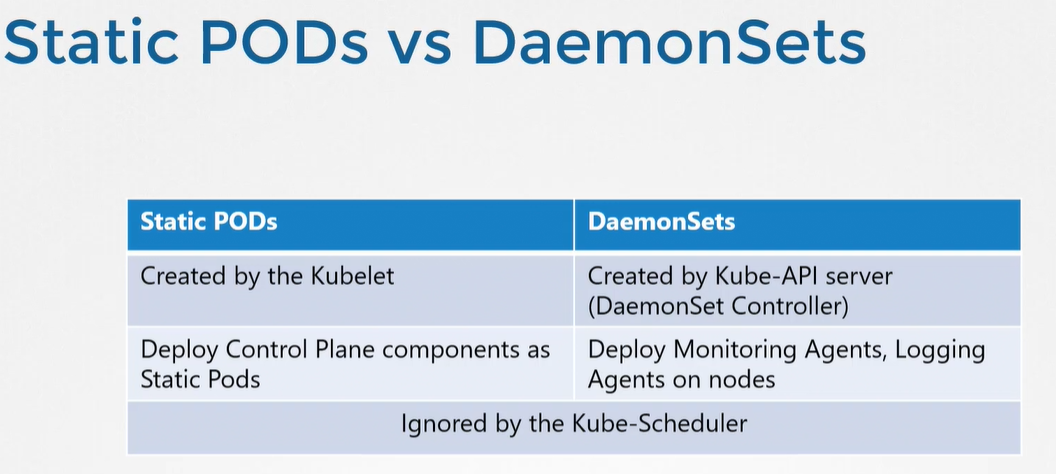
Static Pods are a type of pod in Kubernetes that are managed directly by the kubelet daemon running on a specific node, instead of being managed by the Kubernetes API server. This means that the kubelet on a node will monitor a directory for static pod definitions and manage the corresponding pods automatically, without the need for any external API communication.
Some benefits of using static pods include:
Simple deployment: Static pods are easy to deploy since they don't require any interaction with the Kubernetes API server.
No additional dependencies: Since static pods are managed by the kubelet, they don't require any additional controllers like the deployment controller, which can simplify the overall cluster architecture.
Support for custom components: Static pods can be used to run custom components on a node that are not part of the Kubernetes API, such as monitoring agents or log collectors.
However, there are also some challenges with using static pods, including:
Limited functionality: Static pods don't support many of the advanced features available with other types of pods, such as replication controllers or daemon sets.
Lack of visibility: Since static pods are managed directly by the kubelet, they may be more difficult to monitor and troubleshoot compared to other types of pods.
Scalability: While static pods are easy to deploy on a single node, managing them across a large number of nodes can be challenging since each node must be managed individually.
Overall, static pods are a useful tool for certain use cases, such as running custom components on a node, but they may not be the best choice for more complex applications that require advanced Kubernetes features.
kublet reads manifest file and creates static pods
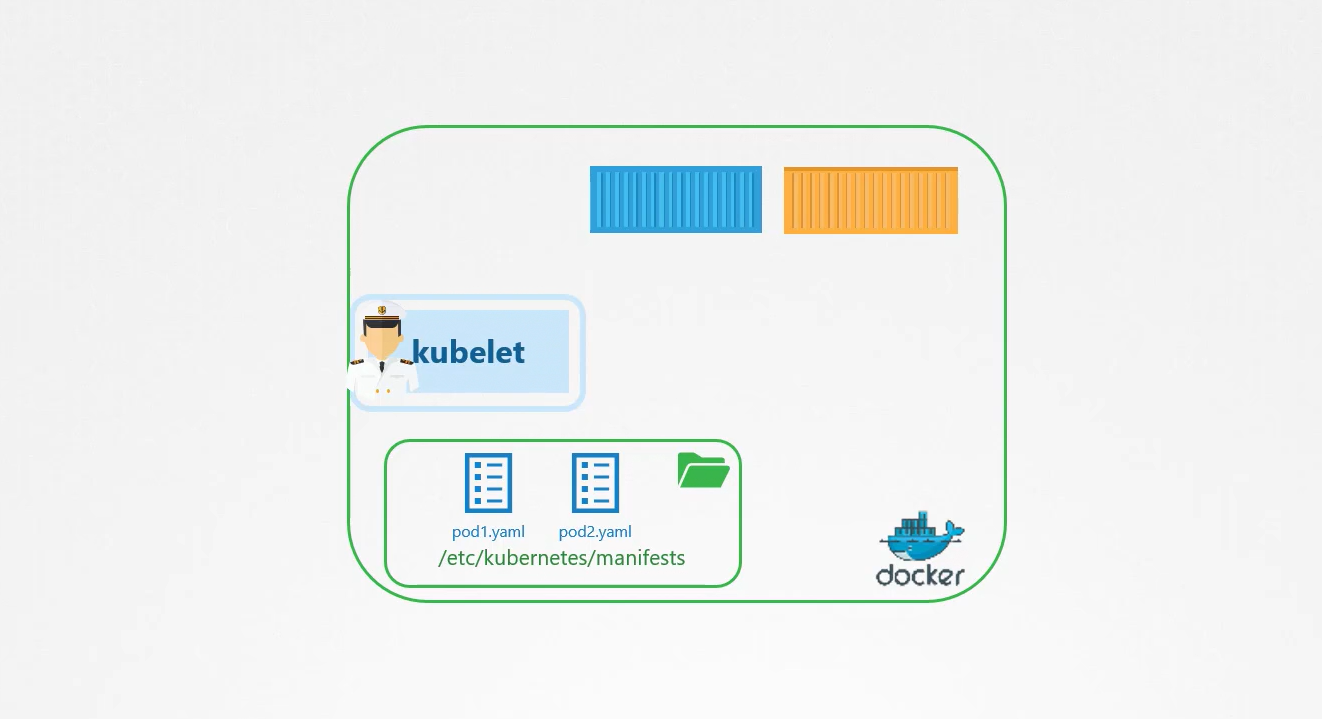
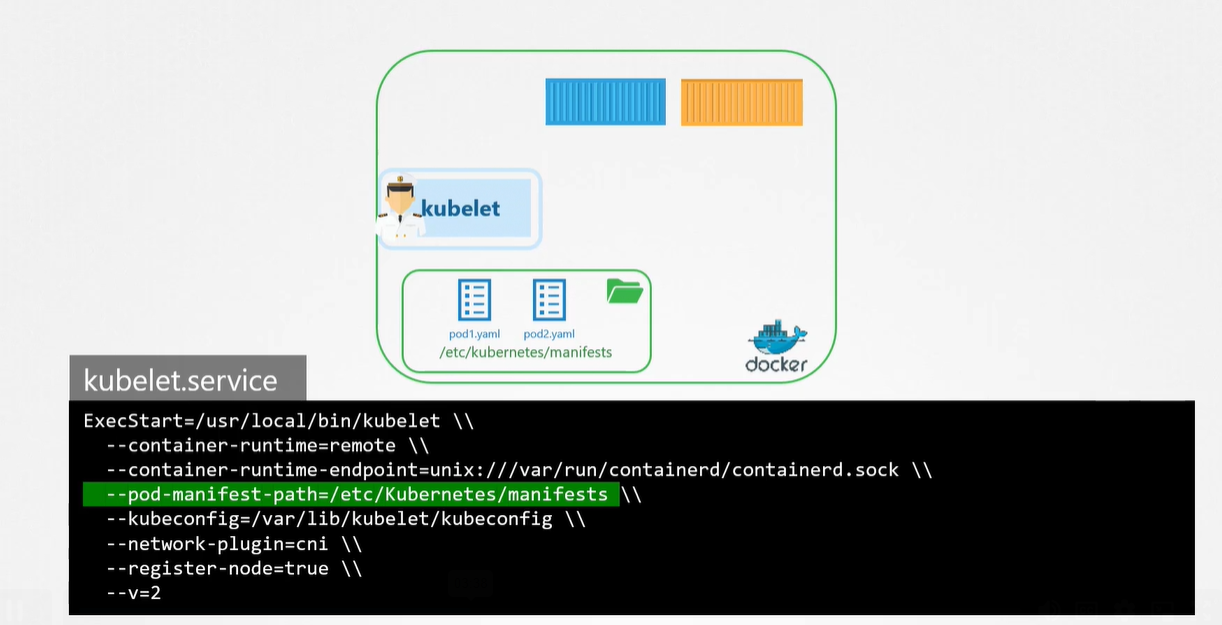
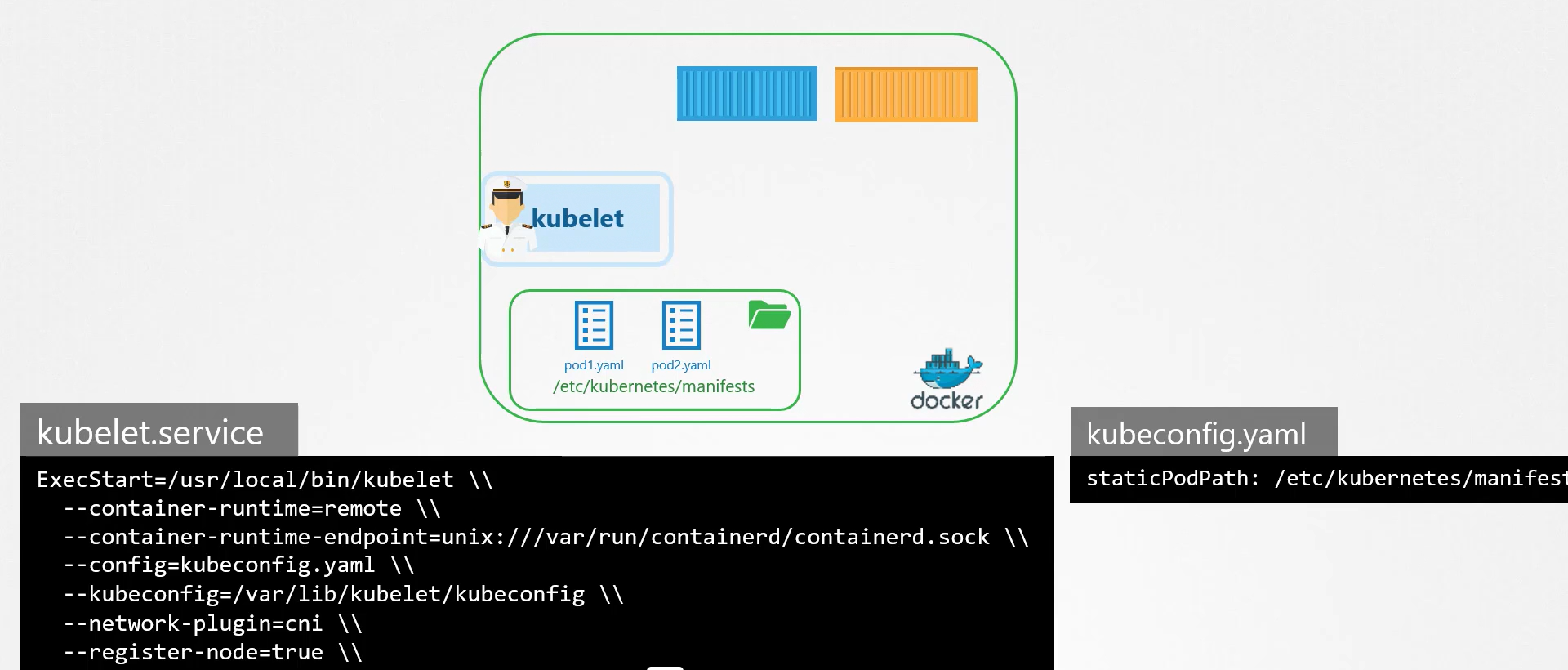
There are two primary ways to create static pods in Kubernetes:
Manual creation: Static pods can be created manually by creating a manifest file that describes the pod and placing it in the correct directory on the node. The manifest file should be named with a
.yamlor.jsonextension, and should be placed in the directory specified by the--pod-manifest-pathflag when starting the kubelet. The kubelet will automatically detect the new manifest and create the corresponding pod.Automated creation: Static pods can also be created automatically by a tool or script that generates the pod manifest file and places it in the correct directory. This can be useful for deploying a large number of static pods across multiple nodes.
In both cases, the manifest file should include the necessary information to define the pod, such as the pod name, container image, and any environment variables or volume mounts required by the container.
It's important to note that static pods are always associated with a specific node, so the manifest file should be placed in the correct directory on the node where the pod should run. Also, since static pods are managed directly by the kubelet, any changes to the pod configuration must be made by updating the manifest file and restarting the kubelet on the node.
Tthe kube-api server is aware of static pods and knows about their existence and status. Although static pods are managed directly by the kubelet on a specific node and not by the Kubernetes API server, the kubelet communicates with the API server to report the status of the static pod.
When the kubelet on a node detects a new manifest file for a static pod, it creates the corresponding pod and reports the pod's status to the kube-api server. The kubelet periodically sends updates to the API server about the pod's status, including information about the pod's containers, status, and health.
The kube-api server stores this information in its etcd database and makes it available to other Kubernetes components, such as the Kubernetes dashboard or the kubectl command-line tool. This allows users to view and manage the status of static pods and other Kubernetes resources from a centralized location, even though the pods themselves are managed by individual kubelet instances on each node.
USECASE:
There are several use cases where static pods can be a useful tool in Kubernetes:
Running custom components: Static pods can be used to run custom components on a node that are not part of the Kubernetes API, such as monitoring agents or log collectors.
Bootstrapping: Static pods can be used to bootstrap a Kubernetes cluster by deploying critical system components, such as kube-proxy or kube-dns, before the Kubernetes API server is available.
Node-specific workloads: Static pods can be used to run workloads that are specific to a particular node, such as data backups or local data processing.
Testing: Static pods can be used for testing and experimentation since they are easy to deploy and manage on a single node.
Custom scheduling: Static pods can be used to schedule pods based on node-specific criteria, such as available hardware resources or node affinity.
Overall, static pods are a flexible and useful tool that can be used to deploy and manage a variety of workloads in Kubernetes, particularly those that are specific to individual nodes or require customization beyond the capabilities of the Kubernetes API.


![Ansible Tower [ AWX ] Installation on k8's](https://cdn.hashnode.com/res/hashnode/image/upload/v1712374070527/cabbd1a9-6568-4e02-a445-f4eb6ecd89e2.png)

![Amazon S3 [Simple Storage Service]](https://cdn.hashnode.com/res/hashnode/image/upload/v1684416654204/c9dcd465-9d73-4e0b-b55e-ba113358db89.png)